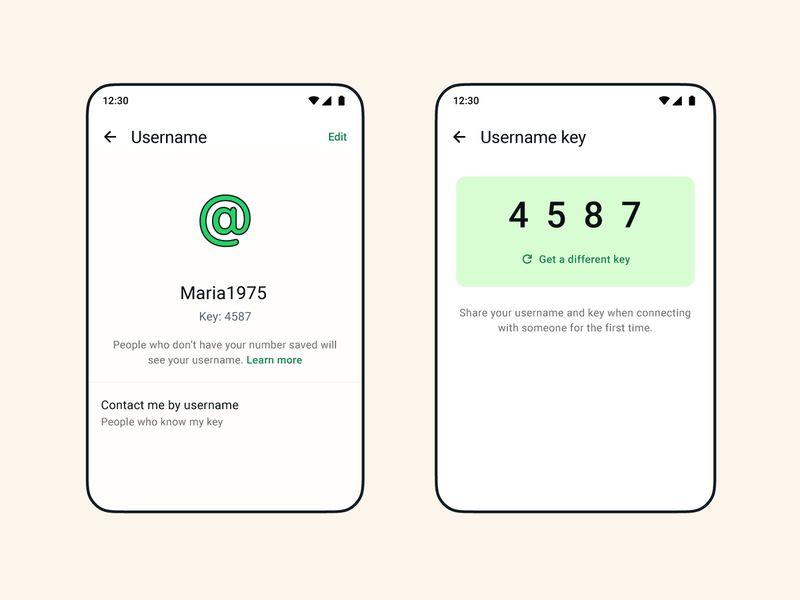
- WhatsApp has started rolling out its new username feature, allowing users to reserve unique usernames
- Every WhatsApp username is exclusive, meaning only one user can own a particular handle
- Here's a detailed step-by-step guide on how users can secure a username, as early reservation gives a better chance of claiming their preferred username before it's taken
WhatsApp's long-awaited username feature is finally rolling out, and if you want your preferred username, you may not want to wait too long.
Because usernames are unique, only one person can claim a particular handle. Once someone else grabs it, it's no longer available.
If you haven't secured yours yet, here's exactly how to do it.
Step-by-step guide on how to secure your username on WhatsApp
Step 1: Update WhatsApp
Before anything else, make sure you're running the latest version of WhatsApp.
Head to the Google Play Store (Android) or the Apple App Store (iPhone) and install the latest update.
Without the newest version, the username feature may not appear.
Step 2: Open the Username Menu
After updating:
- Open WhatsApp
- Tap Settings
- Select Account
- Tap Username
If the feature has reached your account, you'll be able to start creating your username immediately.
Step 3: Choose Your Username
Pick the username you want and complete the setup by creating your unique username key.
Remember, every username is exclusive. If someone else has already claimed the one you want, WhatsApp will let you know and you'll need to choose another.
Can't see the username option? Try this fix
Some users may not see the feature immediately, even after updating the app.
If that's your situation, try these steps:
1. Open WhatsApp Settings.
2. Tap Accounts Centre (Meta).
3. Confirm that your Facebook and Instagram accounts are linked.
After confirming, close the Accounts Centre, reopen WhatsApp and check Settings → Account again.
For many users, the username setup should appear automatically after this.
Why you should reserve your username early
Your username will become another way for people to find and contact you on WhatsApp without needing your phone number.
Whether you're a freelancer, creator, entrepreneur, student, online vendor or someone who simply values privacy, securing your preferred username early gives you the best chance of getting the handle you actually want.
Since each username can only belong to one person, popular names are likely to disappear quickly as the rollout reaches more users.
If the feature hasn't landed on your account yet, don't panic. WhatsApp is releasing it in phases, so keep your app updated and check back regularly. Your chance to claim your username could be just around the corner.
WhatsApp could stop working in Nigeria following $220 million fine by government
Meanwhile, TheRadar earlier reported that the Federal Competition and Consumer Protection Commission (FCCPC) fined WhatsApp $220 million for a data privacy breach.
As a result, the messaging app halted its operations in the country due to additional regulatory requirements.